Your Cold Email Bounce Rate Is Too High. Here's Exactly Why and How to Fix It.
how to reduce cold email bounce rate
If your cold email bounce rate is above 5%, you have a data quality problem — not a deliverability problem. Most SDRs try to fix high bounce rates by warming up their domain more aggressively or switching sending tools. That's treating the symptom. The cause is almost always the same: the contact data you're pulling from isn't verified at a high enough standard before it hits your sequences.
Here's exactly what's happening and how to fix it.
Definition Box Email bounce rate is the percentage of sent emails that are returned undelivered. A hard bounce means the address doesn't exist or the domain is invalid. A soft bounce means the inbox is temporarily full or the server was unavailable. In cold outreach, hard bounces above 5% signal bad data and actively damage your sender domain reputation with mail servers.
Why Your Bounce Rate Is High (The Real Reasons)
Reason 1: Your data source has stale contacts
B2B contact data decays at 22–30% per year. Every year, roughly 1 in 4 contacts in your database has changed jobs, had their email deactivated, or moved to a domain that no longer accepts mail. If your data provider refreshes their database every 6–12 months, you're working with records that are already partially outdated the moment you pull them.
This is the most common cause of high bounce rates — and the one most teams ignore because they trust their tool's "verified" label without asking when it was verified.
Reason 2: You're emailing catch-all domains
A catch-all domain accepts all incoming emails regardless of whether the specific address exists. Most verification tools return "valid" for catch-all addresses because the domain accepts the ping — but the email may route to an unmonitored inbox or nowhere at all.
Catch-all domains typically make up 15–25% of a B2B contact list. If you're not flagging and handling them separately, they're inflating your apparent bounce rate and wasting send volume.
Reason 3: Your data source doesn't verify in real-time
There's a critical difference between a tool that verified an email six months ago and one that verifies it at the moment you export. Static databases verify once, store the result, and serve it until the next refresh cycle. Real-time verification checks the mail server at the point of export.
Apollo, for example, has reported real-world bounce rates of 15–25% on sourced contacts — well above the 5% threshold. This happens because their verification isn't continuous. Inbound Labs' 98% deliverability rate is maintained through continuous re-verification, not a one-time check.
Reason 4: You're hitting role-based or shared inboxes
Emails like info@, hello@, support@, contact@, and sales@ are role-based addresses — they go to a team inbox, not an individual. Most mail servers treat high volumes sent to role-based addresses as spam signals. Even if they don't bounce, they don't convert, and they hurt deliverability metrics.
A good data source flags role-based addresses so you can exclude them from sequences.
Reason 5: Your sending volume outpaced your domain warmup
If you added 500 new contacts to a sequence on a domain that's only been sending 20–30 emails per day, the sudden spike looks suspicious to mail servers. Even with clean data, aggressive volume scaling on an under-warmed domain will generate soft bounces and spam folder placement.
This is a real issue — but it's secondary to data quality. Fix your data first, then address warmup.
The Fix: A Systematic Approach to Getting Under 5%
Step 1: Audit your current data source
Pull a sample of 200 contacts from your current data source and run them through NeverBounce or ZeroBounce. Look at:
- What percentage are flagged as invalid?
- What percentage are catch-all?
- What percentage are role-based?
If more than 8–10% of your sample fails this check, your data source is the problem. No amount of domain warming or sending tool optimization will fix a 20% bounce rate that comes from bad data.
Step 2: Switch to a source with real-time verification
The only durable fix for chronic bad data is upgrading your data source to one that verifies contacts continuously — not just at point of collection.
Inbound Labs maintains 98% deliverability across 280M contacts through continuous verification. When you pull a contact, you're getting data that has been checked recently — not data that was verified once 9 months ago and hasn't been touched since.
See how InboundLabs verified contact data reduces bounce rates → inboundlabs.app
Step 3: Separate catch-all domains from your main sequences
Don't delete catch-all contacts — but don't treat them the same as fully verified addresses either. Build a separate sequence for catch-all domains with lower send volume, shorter sequences, and more personalization to reduce the risk of spam flagging.
Alternatively, use a secondary tool like Prospeo or Bouncer to attempt secondary verification on catch-all addresses before including them.
Step 4: Enforce role-based address filtering
Before any list enters a sequence, filter out all role-based prefixes: info@, hello@, contact@, support@, sales@, admin@, team@, hr@, careers@. Most data tools let you filter these at export. If yours doesn't, add a column in your spreadsheet and filter manually.
Step 5: Ramp sending volume correctly
After fixing your data source, re-warm your domain if your bounce rate history has already caused mail server flags:
- Week 1–2: 20–40 emails/day per inbox
- Week 3–4: 50–80 emails/day per inbox
- Week 5+: Scale to 100–150 emails/day per inbox maximum
Use a warm-up tool like Instantly or Mailreach to run parallel warmup traffic while you're scaling sequences. Never jump from 20/day to 200/day overnight.
Bounce Rate Benchmarks: What Your Number Is Actually Telling You
After auditing hundreds of cold email campaigns, here's how benchmark numbers map to root causes:
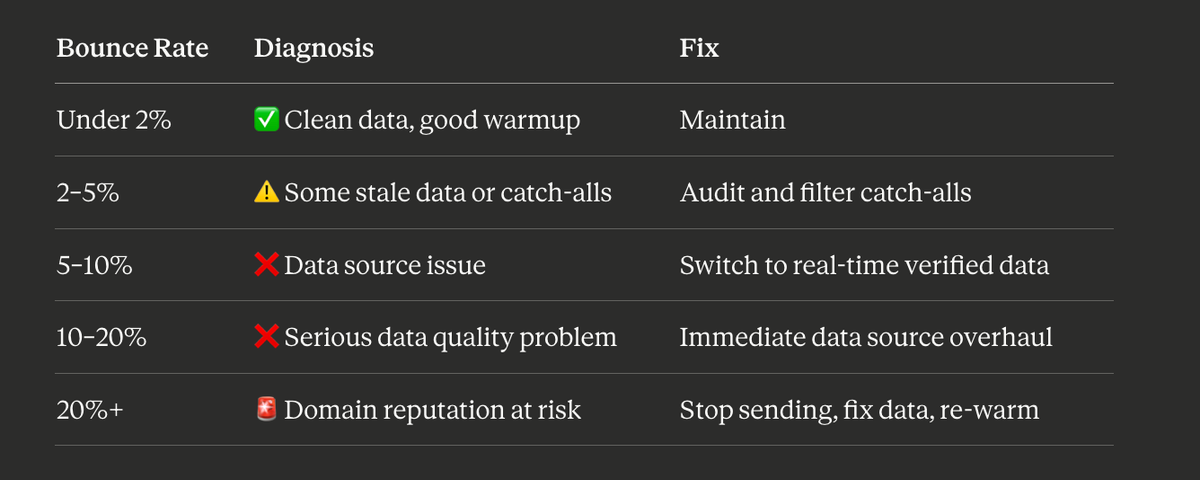
If you're in the 10–20% range, stop sending new campaigns until you've fixed the source. Continuing to send at that rate accelerates domain reputation damage and can get your sending domain blacklisted — which is a multi-week recovery process.
What a Clean Data Workflow Looks Like
Here's the end-to-end workflow that keeps bounce rates under 3%:
- Pull contacts from a real-time verified database (Inbound Labs, UpLead, or Cognism for EMEA)
- Filter at export: Remove role-based addresses, flag catch-alls for separate treatment
- Secondary check on catch-alls: Run through NeverBounce before including
- Load into a warmed sending infrastructure: 1 inbox per 100 contacts/day maximum
- Monitor bounce rate after first 50 sends: If over 3%, pause and audit the specific segment
- Monthly list hygiene: Re-verify any contact that hasn't been emailed in 60+ days before re-engaging
This workflow adds 20–30 minutes per list build. It saves you weeks of domain recovery if you skip it.
Conclusion
A cold email bounce rate above 5% is a data problem, not a tools problem. The fix isn't switching sequencers, it's switching data sources — specifically, moving to a provider that verifies contacts continuously rather than at point of collection.
Inbound Labs maintains 98% deliverability across 280M B2B contacts through real-time verification. If your current tool is delivering 15–25% bounce rates, the gap between where you are and where you need to be is one data source switch away.
Apollo.io Alternatives in 2026: 7 Tools with Better Data Accuracy for Enterprise Sales Teams
Common Questions About Cold Email Bounce Rates
What is a good cold email bounce rate? Under 5% is the acceptable threshold. Under 2% is excellent. Above 5% and mail servers start treating your sending domain as a spam risk. Above 10%, active deliverability degradation sets in — meaning even your valid contacts start receiving your emails in spam folders.
What's the difference between a hard bounce and a soft bounce? A hard bounce means the email address doesn't exist or the domain is invalid — permanent failure. A soft bounce means the inbox is temporarily full or the server was temporarily unavailable — potentially recoverable. In cold outreach, hard bounces are the dangerous ones. If the same address soft-bounces twice, treat it as a hard bounce.
Can warming up my domain fix a high bounce rate? No. Domain warmup addresses sending volume and sender reputation with mail servers. It cannot fix bounces caused by invalid email addresses. If your data has 20% invalid addresses, warming your domain doesn't change that — you'll still bounce 20% of sends. Fix the data source first.
Why does Apollo.io have such high bounce rates? Apollo's email verification is not continuous. Contacts are verified at point of collection and stored until the next database refresh. B2B data decays at 22–30% per year, meaning contacts sourced 6–12 months ago may have 15–25% invalid addresses by the time you use them.
What is a catch-all email domain? A catch-all domain is configured to accept all emails sent to it, regardless of whether the specific address exists. Verification tools return "valid" for these addresses because the server accepts the ping — but the email may reach no one. Always segment catch-all addresses from fully verified contacts in your sequences.
How do I check if an email address is valid before sending? Use a real-time verification tool like NeverBounce, ZeroBounce, or pull directly from a database that verifies at export like Inbound Labs. Never trust a "verified" label without knowing when and how the verification was done.
Last updated: April 2026
More from the Sales Hub
Cold Email Stats by Day of Week: What the Data Says
Why day of week matters for cold email: Inbox timing is not just about when your email arrives. It is about when your prospect is in a mental state to evaluate a new opportunity. Mondays are for catching up. Fridays are for clearing out. Tuesday through Thursday is when attention to external requests is highest, and that attention gap is where your email either earns a read or gets archived permanently.
Multichannel Sequences: The Complete Guide
What is a multichannel sequence? A multichannel sequence is a structured outbound playbook that coordinates touchpoints across two or more channels, typically email, LinkedIn, and phone, over a defined time window. Each channel has a planned role, a specific timing, and a message tailored to that channel's context, rather than copy-pasting the same email across every medium.
Email Sequence Best Practices That Still Work in 2026
What is an email sequence? An email sequence is a pre-planned series of outreach emails sent to a prospect at set intervals. A cold outbound sequence typically runs 4 to 7 touches over 14 to 30 days, mixing subject line variations, different content angles, and channel shifts to maximize reply probability without tripping spam filters or burning list health.
Cold Email Domain Setup Checklist: 12 Steps (2026)
Every cold email sending domain needs the same 12-step setup before it sends a single real campaign email. Register a secondary domain, add mailboxes, publish SPF, DKIM, and DMARC, add a redirect and a custom tracking domain, enroll in Postmaster Tools, then warm up for weeks. Skip the warm-up or ru
Try our data quality
for free.
No commitment. No credit card. Just 50 free verified contact lookups.